Data Sets
Custom Reports have 5 data sets which are as follows:
- Enrollments
- Club Projects
- Group Enrollments
- Waivers
- Events
To choose a data set, click the "Data set" drop down field:
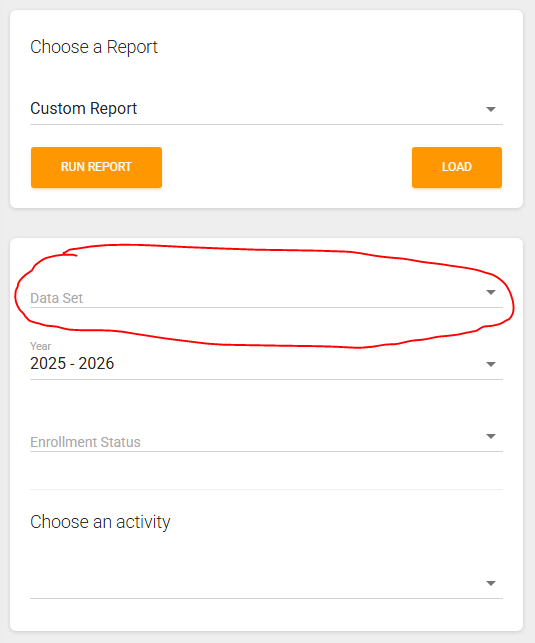
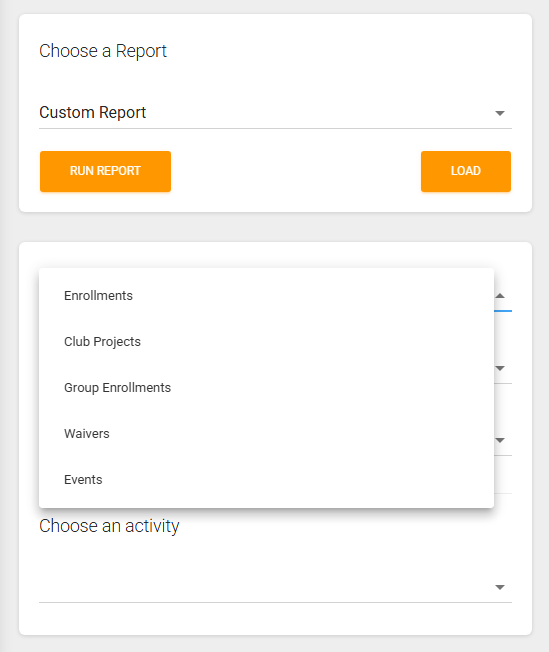
Each data set has it's own different types of filters, but most will have an "Enrollment Year" filter. With your data set chosen and filters set, click the "Run Report" button to load up the custom report and then you can move onto customizing your report!
Here is an explanation of each data set:
Enrollments:
The enrollments data set pulls one row per enrollment in your state depending on the year selected as well as the enrollment status options picked. The fields that will be included are all of the fields on the "Personal Information" section of the enrollment as well as their enrollment requirement data and their enrollment additional fields.
Club Projects:
The club projects data set allows you to pull one row per project that a person is enrolled in. It will pull all the same data as the enrollments data set along with the data that is tied to a project if your state asks additional questions as part of the project enrollment.
Group Enrollments:
If your state fills out group enrollments in our system, the group enrollments data set lets you run a report of every group enrollment in your county/state (depending on your account type) for the selected year. The fields that are included in this data set are all the questions asked in the group enrollment form
Waivers:
The waivers data set allows you to pull one row per enrollment in your state depending on the year selected as well as the waiver that was selected. This report can only be run for one waiver at a time. With a year and waiver selected, the fields that are included in the waiver are all of the questions asked in the Personal Information tab along with the questions asked in the selected waiver. Also, just like in the enrollment data the requirements data and the additional fields will also be included in this data set.
Events:
The events data set is unique from the other data sets as it does not have you pick an enrollment year but instead pick a date range that you would like to run the report for and will get a list of reports that are in the system inside of the date range. The events report does not report out data for every event registration inside of that date range, it gives you a list of events. The fields included in this data set are as follows:
- Id
- Status
- Name
- Start Date
- End Date
- Location
- County
- Registration Open
- Registration Close
- Is Statewide
- Is County Wide
- Index
- Contact Name
- Contact Phone
- Contact Email
- Base Fee
- Approval Required
- Enrollment Required
- Reg Required
- Created at
- Updated At
Created with the Personal Edition of HelpNDoc: Streamline Your Documentation Creation with a Help Authoring Tool